
Shared Hosting vs Cloud Hosting:
The Ultimate Hostinger Showdown
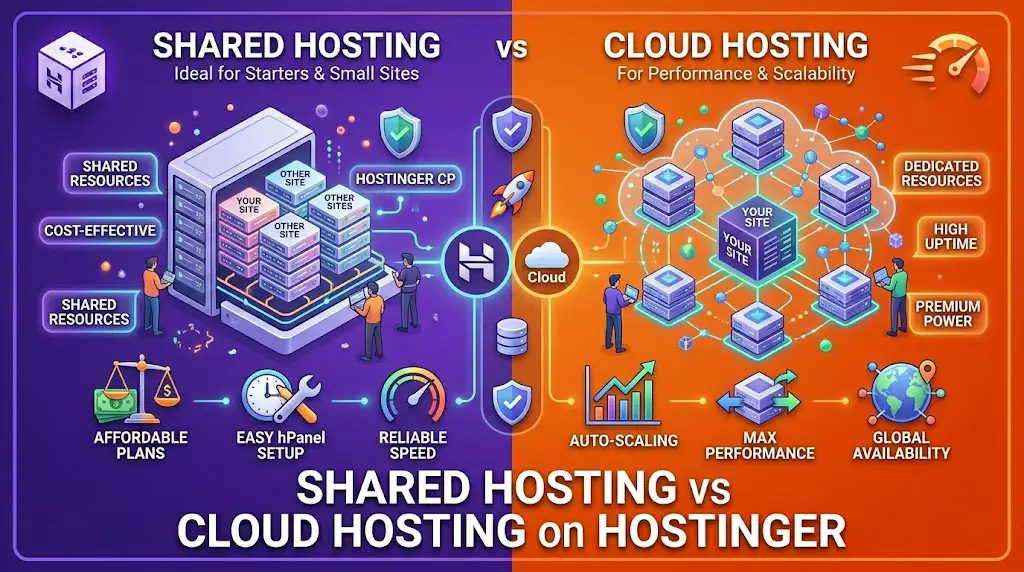
Choosing the wrong plan can throttle your growth or drain your budget. We’ve benchmarked every metric to help you decide between budget-friendly stability and enterprise-grade power.
Before we dive into the technicalities, make sure to grab the best deals via our
Hostinger Coupons
portal for exclusive 2026 discounts.
Resource Allocation: Shared vs. Cloud
Hover over the cards to see how Hostinger handles your site’s power in 2026.
Standard NVMe
40%
Shared hosting uses LiteSpeed Enterprise to distribute power. While fast, you share the underlying CPU/RAM with other users, which is ideal for cost-efficiency.
Dedicated Resources
100%
Cloud hosting offers Isolated Resources. You get a dedicated slice of the server, ensuring peak performance even during viral traffic surges in 2026.
Check the latest benchmarks on our performance audit page.
Which One Fits Your Project?
Choosing based on your 2026 goals, not just your current budget.
Shared Hosting is Perfect for:
- 📌 Personal Blogs: Best for sites targeting under 50k monthly visitors.
- 📌 Portfolio Sites: Low maintenance for photographers and designers.
- 📌 Local Businesses: Ideal for service providers in Damietta or Port Said.
Cloud Hosting is Required for:
- 🚀 E-commerce Stores: Essential for WooCommerce sites during high-sales seasons.
- 🚀 Corporate Portals: When 100% uptime is non-negotiable for clients.
- 🚀 SaaS Projects: High-resource apps that need dedicated RAM/CPU.
Expert Advice: If you are an instructor selling
WordPress courses,
starting with Shared is fine, but Cloud ensures your students never face slow loading times.
Cost vs. Value: The 2026 Breakdown
Don’t just look at the entry price; consider the long-term ROI for your business.
BUDGET KING
Shared (Business Plan)
Renews at $8.99/mo
- ✅ Free Domain ($9.99 Value)
- ✅ Standard NVMe Storage
- ✅ Unlimited Free SSL
- ❌ Shared RAM/CPU resources
Cloud Startup
Renews at $19.99/mo
- 🚀 3GB Dedicated RAM
- 🚀 2 CPU Cores (Isolated)
- 🚀 Dedicated IP Address (Free)
- 🚀 Priority 24/7 Support
Pro Tip: Use our promo link to lock in the 48-month rate for the maximum discount possible in 2026.
Server-Side Specs: The Raw Data
| Technical Metric | Shared (Business) | Cloud (Startup) |
|---|---|---|
| RAM Allocation | 1.5 GB (Shared) | 3 GB (Dedicated) |
| CPU Cores | 1 Core (Shared) | 2 Cores (Dedicated) |
| Disk Technology | NVMe SSD | NVMe SSD (Enterprise) |
| Dedicated IP | Not Included | FREE Included |
| Object Cache | Available (LiteSpeed) | Enabled (Redis Included) |
| Inodes Limit | ~600,000 | ~2,000,000+ |
Developer Note: If you are managing multiple WordPress course sites, the higher Inodes and RAM on Cloud Startup prevent database slowdowns during high concurrent student logins.
Global Reach: Where Is Your Website?
Hostinger’s 2026 infrastructure spans the globe. Choosing the right server location is the first step to a perfect Core Web Vitals score.
Want the fastest speeds in Egypt? Check out our optimized hosting guides for local business growth.
Bulletproof Security: Your Data’s Safety
🛡️ Managed WAF
Both plans feature Hostinger’s advanced Web Application Firewall. However, Cloud Hosting receives enhanced real-time threat detection, essential for high-traffic sites in 2026.
🔄 Backup Frequency
Shared Business plans include Daily Backups. On Cloud plans, Hostinger’s infrastructure ensures snapshots are taken at the storage level, allowing for near-instant restoration of large databases.
🔑 Dedicated IP Advantage
Cloud Hosting provides a Dedicated IP. This prevents your SEO and email reputation from being damaged by “bad neighbors” who might engage in spam activities on shared servers.
Protecting your WordPress course assets is vital. Always ensure your hosting provider offers robust redundancy.
The Expert Verdict: When to Upgrade?
Stop guessing. Use this 2026 roadmap to scale your infrastructure at the right time.
✅ Stay on Shared If…
- 🔹 Your traffic is under 50,000 visits per month.
- 🔹 You are building a landing page or a simple blog.
- 🔹 You are just starting your WordPress course journey.
- 🔹 Budget is your primary concern over absolute peak performance.
🚀 Upgrade to Cloud If…
- 🔸 You experience “Slow Admin” dashboards in WordPress.
- 🔸 Your site handles WooCommerce transactions daily.
- 🔸 You need a Dedicated IP for better email deliverability.
- 🔸 You want 100% resource isolation for enterprise-level SEO.
Pro Tip: Hostinger’s hPanel allows for a “One-Click Upgrade.” You can start small and move to the Cloud in under 2 minutes when your traffic spikes.
5 Steps to Peak Performance in 2026
Whether you choose Shared or Cloud, follow this workflow for maximum SEO impact.
Data Center Selection
Choose a server location closest to your main audience (e.g., Netherlands for Europe/Middle East) to achieve a < 100ms TTFB.
Activate LiteSpeed Enterprise
Install the LiteSpeed Cache plugin in WordPress and enable “Object Cache” (Redis/Memcached) for a perfect Core Web Vitals score.
SSL & Security Hardening
Force HTTPS and enable Hostinger’s basic WAF rules to prevent brute-force attacks on your login page.
Advanced Learning: For those enrolled in my WordPress Advanced Course, we deep-dive into these server configurations to ensure your site loads in under 1 second.